Links to send
A first CV
- CV for a 16-year-old: a complete UK example: A Year 11 pupil with predicted GCSEs and no job yet
- CV for a 16-year-old in Scotland: a complete example: The same in Scotland, with National 5s and Highers
- Student CV example for a part-time job: A student applying for a part-time job
- Apprentice CV example: A college leaver applying for an engineering apprenticeship
- First job and student CV examples: Every first-job and student example
- CV with no experience: UK structure and examples: What to write when there is no work history yet
Templates to download
- Blank CV templates: Blank Word and PDF files in every design, nothing to delete first
- School leaver and apprenticeship CV template: A template set out for school leavers
- Free CV templates for Word: Word files, with how to check them before sending
- Google Docs CV template: UK files and export steps: Using the files in Google Docs
Tools that work in the browser
- Free UK CV builder: Write the CV, with lines from part-time jobs people often have
- CV checker: see exactly what to fix: Check a finished CV against fixed rules
- Tailor your CV to a job description: Compare a CV with a real advert
- Free cover letter builder: A cover letter matched to the CV
- Update your CV without starting over: Bring in an old CV from Word, PDF or text
Facts to teach from
- UK CV rules: photo, age, address, references and length: What a UK CV leaves out, and why, with GOV.UK sources
- Personal statement: CV or UCAS? Which one you need: CV personal statement or UCAS: which one you need
- Accessible CV: make your CV easy to read for everyone: Making a CV easy to read for everyone
- How long does it take to find a job in the UK?: How long people in the UK are unemployed, from ONS
- Do NHS apprenticeships ask for experience? What 11 adverts said: What 11 NHS apprenticeship adverts asked for in experience
A CV session using these tools
Five steps, in the order the site’s tools follow. Writing and checking need only a browser; opening the downloaded file needs Word, Google Docs or a PDF reader. The examples are fictional, so students replace every name, school and job with their own.
- Choose. Each student opens the example nearest to them (school, college, part-time job, apprenticeship) and reads how it is set out.
- Write. They open it in the editor and replace every detail with their own. “Tasks from a job you have done” turns a part-time or holiday job into lines they can edit.
- Check. The checker lists what is missing, such as a full postcode where a town is enough or an email address without their name, and links to the fix.
- Tailor. They paste a real local advert and see which of its requirements the CV already shows.
- Save. They download the Word or PDF file and open it again before closing the browser.
Students with no job yet can use school, clubs, volunteering and things they do at home: the no-experience guide shows how, and the 16-year-old example is built that way.
The parts of a UK CV
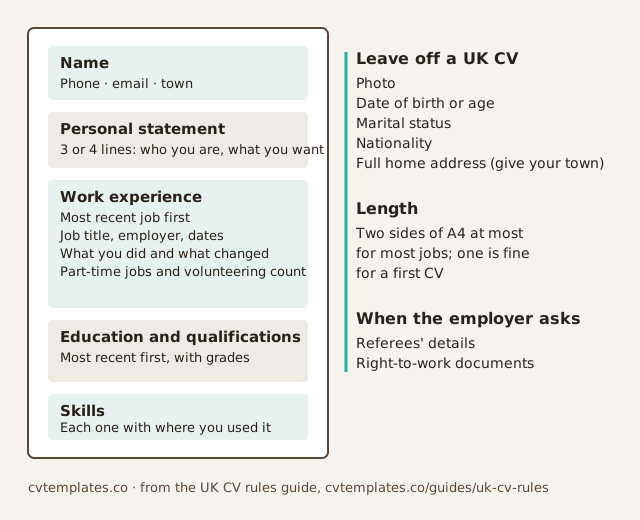
You may reuse this figure and chart with a link to this page. Put it on a slide or a careers page; to show it on a web page, copy this code:
<a href="https://cvtemplates.co/resources/careers-advisers"><img src="https://cvtemplates.co/resources/parts-of-a-uk-cv.svg" width="640" height="520" alt="The parts of a UK CV, from CVTemplates.co"></a>Sharing our pages and files
Send the links as often as you like. Each student downloads and edits their own copy for their own applications, as our terms of use allow. The terms also say what needs our permission first, such as republishing the template library.